Back to floatbird
Live · macOS · menu bar app

btkey

A tiny Mac menu bar app that listens for a global hotkey and connects you to a chosen Bluetooth device. No fumbling through System Settings or the Bluetooth menu. One keystroke.

Why it exists

macOS makes connecting to a specific Bluetooth device take more clicks than it should: open the menu bar widget, find the device, click, wait. If you switch between headphones and a speaker (or two pairs of headphones) all day, that friction adds up.

btkey collapses the whole thing into a keystroke. Pick the device once. Pick a hotkey once. From then on it’s instant.
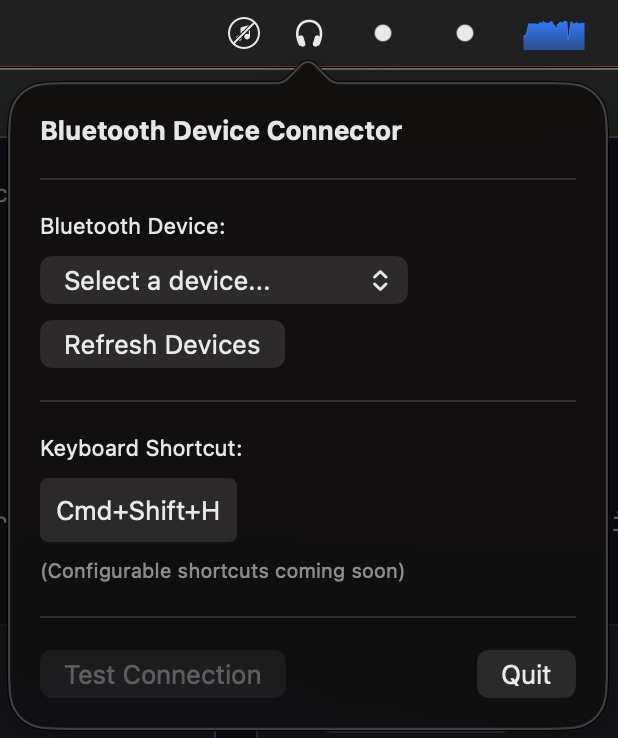
The btkey menu bar popover: a device picker, a global keyboard shortcut, and a test-connection button.
The menu bar popover. Pick a device, set a hotkey, done.

How it works

It lives in the menu bar. Pick the Bluetooth device you connect to most. Pick a global hotkey for it. Whenever you want to connect, hit the key.

That’s the whole app.
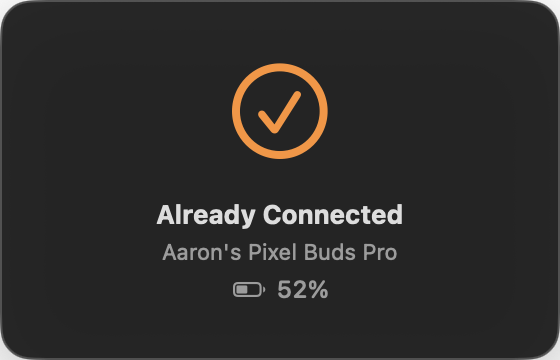
A confirmation card reading 'Already Connected, Aaron's Pixel Buds Pro' with a battery indicator at 52%.
After hitting the hotkey: a quick confirmation, with battery level when the device reports one.